

Turn lectures into clear notes, flashcards & quizzes.

Put your phone on your desk and hit record. TelaNotes separates the professor's voice, links every bullet point to live audio playback, and turns your lectures into instant exam study guides.

  • Lecture audio
  • Summary & key points
  • Bio 101 notes
  • PDF & slides
  • 3 tasks in ToDos
  • 40+ languages
  • Chalkboard scan
  • Quiz Friday alert
  • Professor voice
  • YouTube link
  • 1.5x audio speed
  • “What was on slide 4?”
  • Voice memo
  • Spanish to English
  • Key definitions
  • Saved on phone
  • Speaker lines
  • #biology #exam

Bio 101 · Today2 speakers · 45 min

Review chapter 4 for Friday's quiz and finish the lab questions.

  • Quiz covers cell energy and basic enzymes from slides 10 to 25
  • Professor confirmed the exam curve will be posted tonight
  • Lab report due Thursday night before midnight

Summary Flashcards (6) Ask note
Five ways a study note begins.

Record a lecture hall, open an audio file or YouTube link, drop in a PDF, scan textbook pages, or translate a foreign language seminar. Everything lands in the same list on your phone.

  1. Live mic

    Voice

    Set your phone down in meetings, classes, or walks. Each person gets a separate speaker label.

    3 voices separated · 28 min sync

  2. Audio & links

    Files & YouTube

    Bring in saved voice memos or paste a YouTube link to turn long talks and interviews into written notes.

    Guest lecture link · 54 min audio

  3. PDF & DOCX

    Documents

    Open PDFs and Word files for a plain overview, bulleted key points, and follow-up questions.

    24-page brief · PDF

  4. Camera OCR

    Camera scan

    Snap handouts, book chapters, or whiteboard notes with your camera and search the text right away.

    3 printed pages scanned

  5. 40+ languages

    Live translate

    Talk or type across 40+ languages with two-way speech translation, or write a quick text note by hand.

    Spanish & English session

One recording. Eight ways to read it.

Open any note to move between the full speaker transcript, summaries, tasks, people mentioned, translations, and chat without losing your place in the audio.

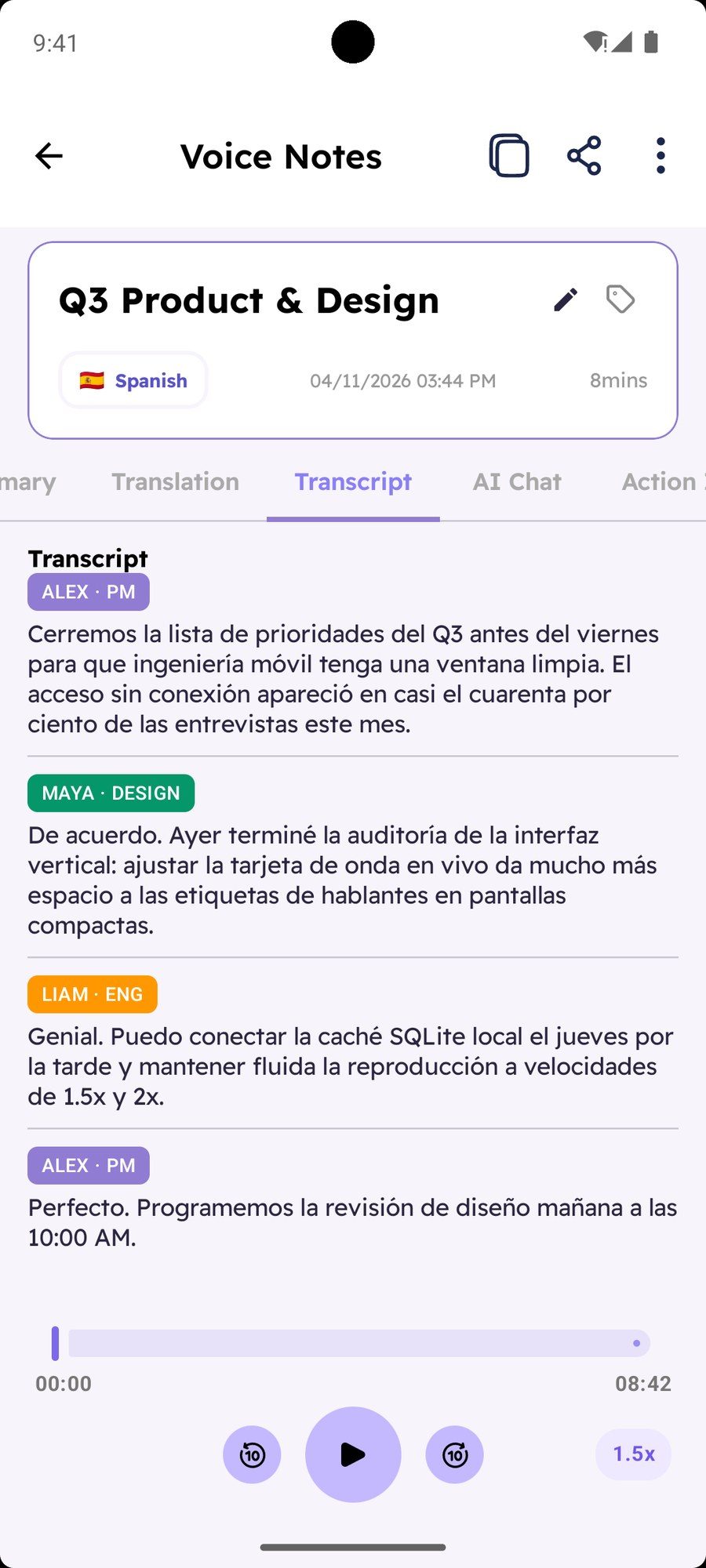
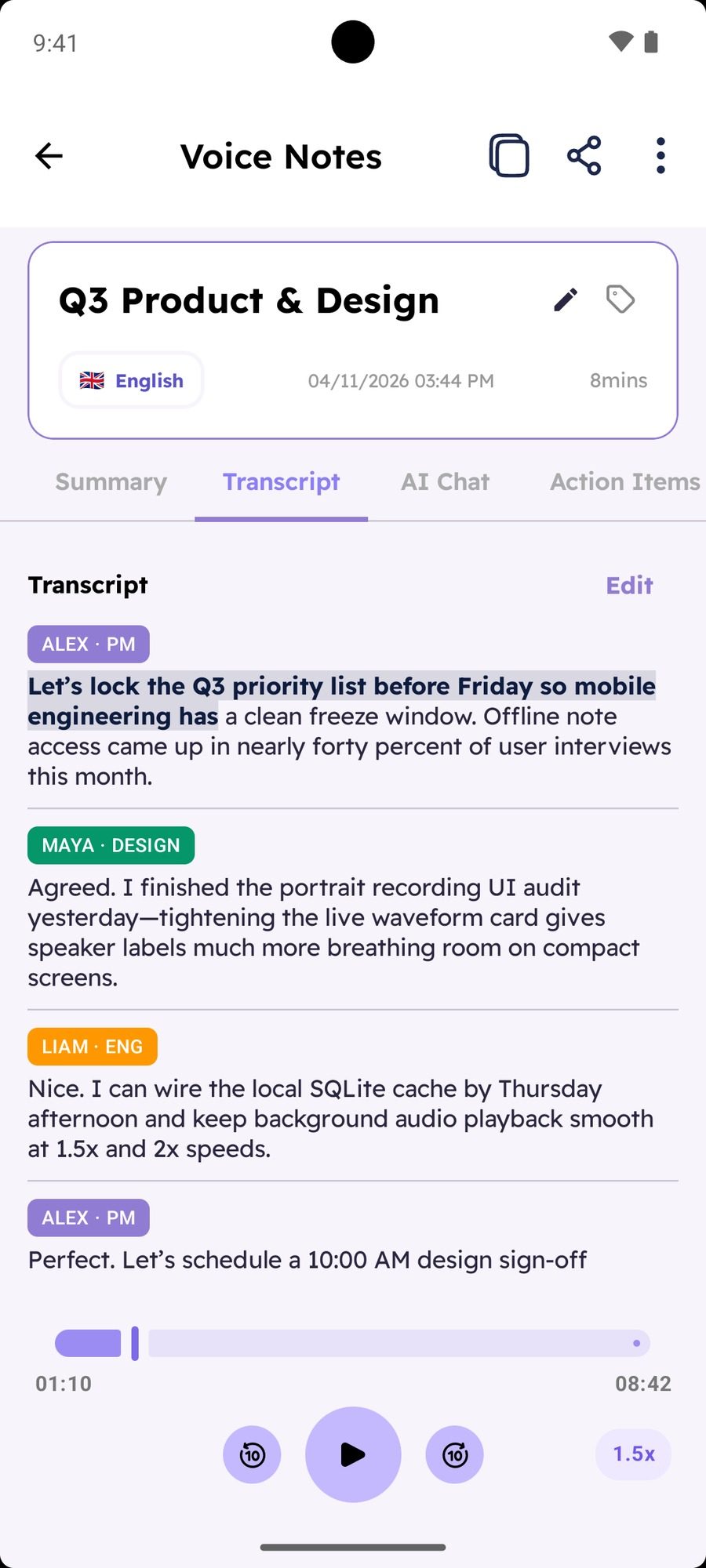
TelaNotes Transcript tab with speaker badges for Alex PM, Maya Design, and Liam Eng, word highlight, and 1.5x audio player
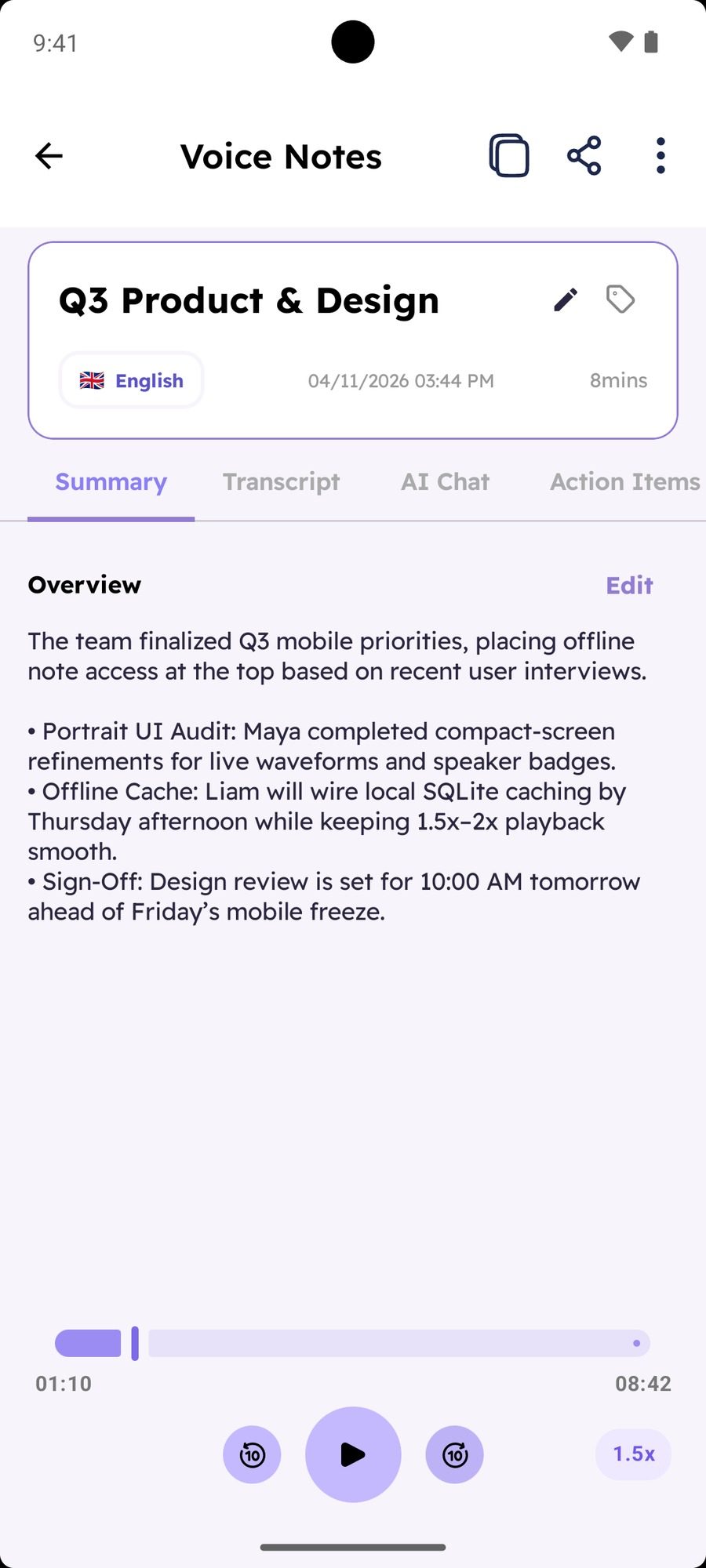
TelaNotes Summary tab showing meeting overview, priority decisions, and Regenerate Summary button
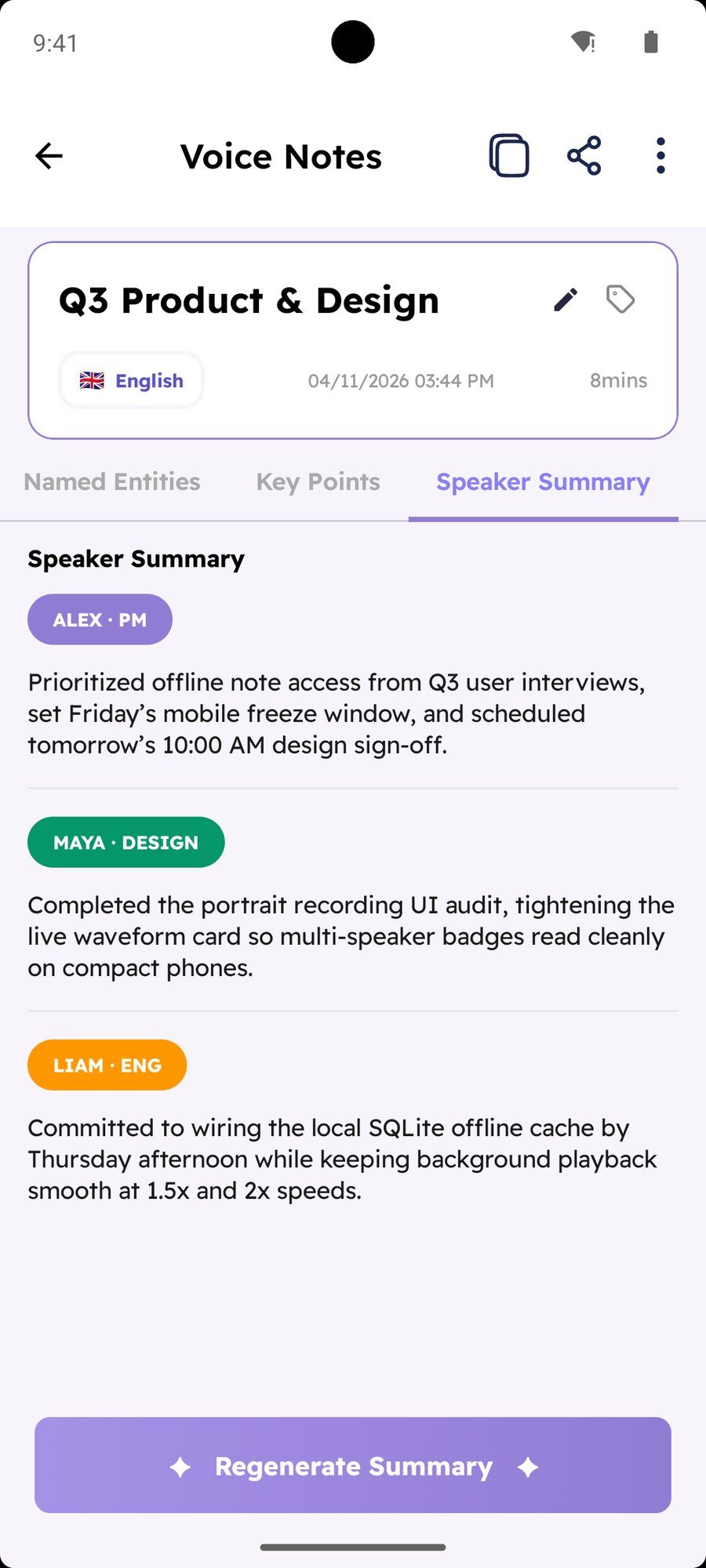
TelaNotes Speaker Summary tab breaking down what Alex PM, Maya Design, and Liam Eng each said
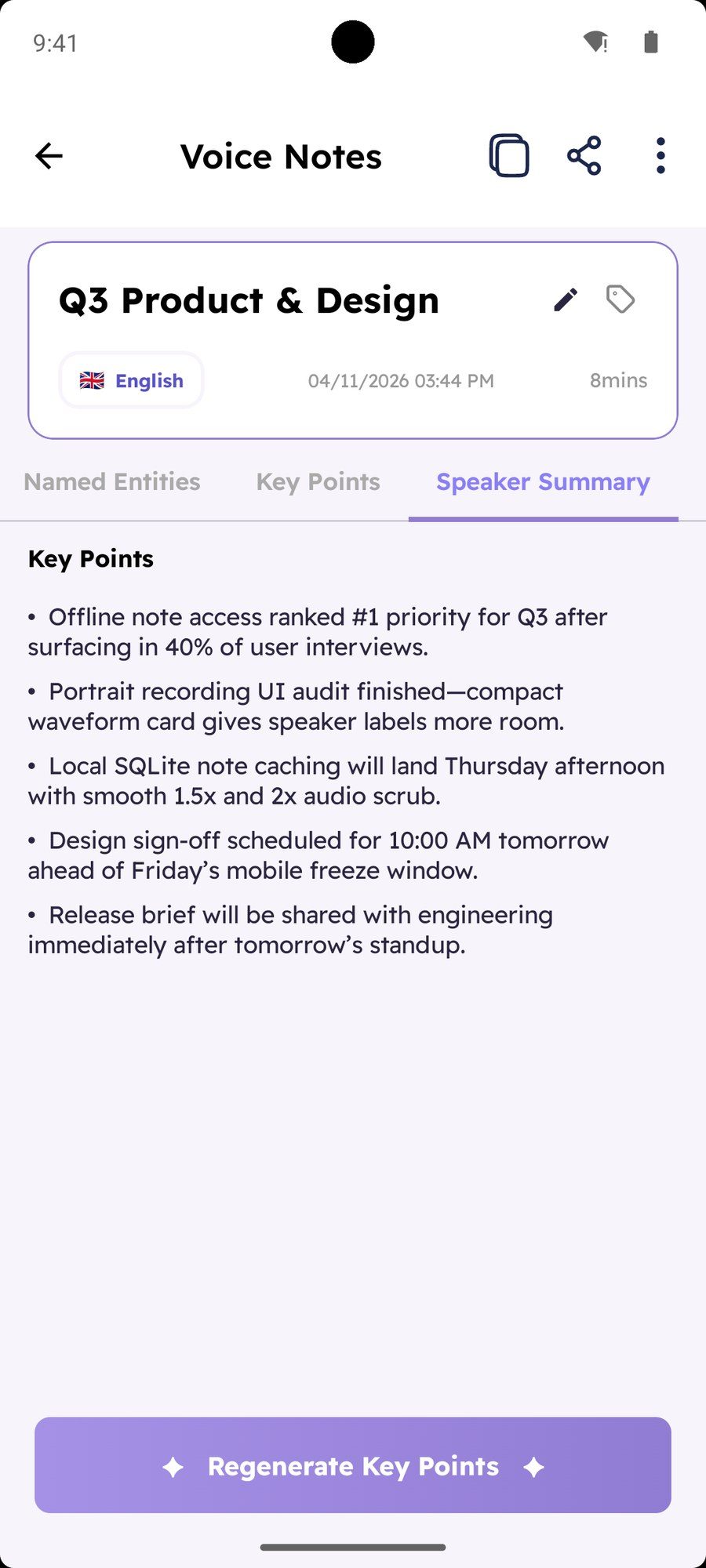
TelaNotes Key Points tab listing five concise decisions from the Q3 sync
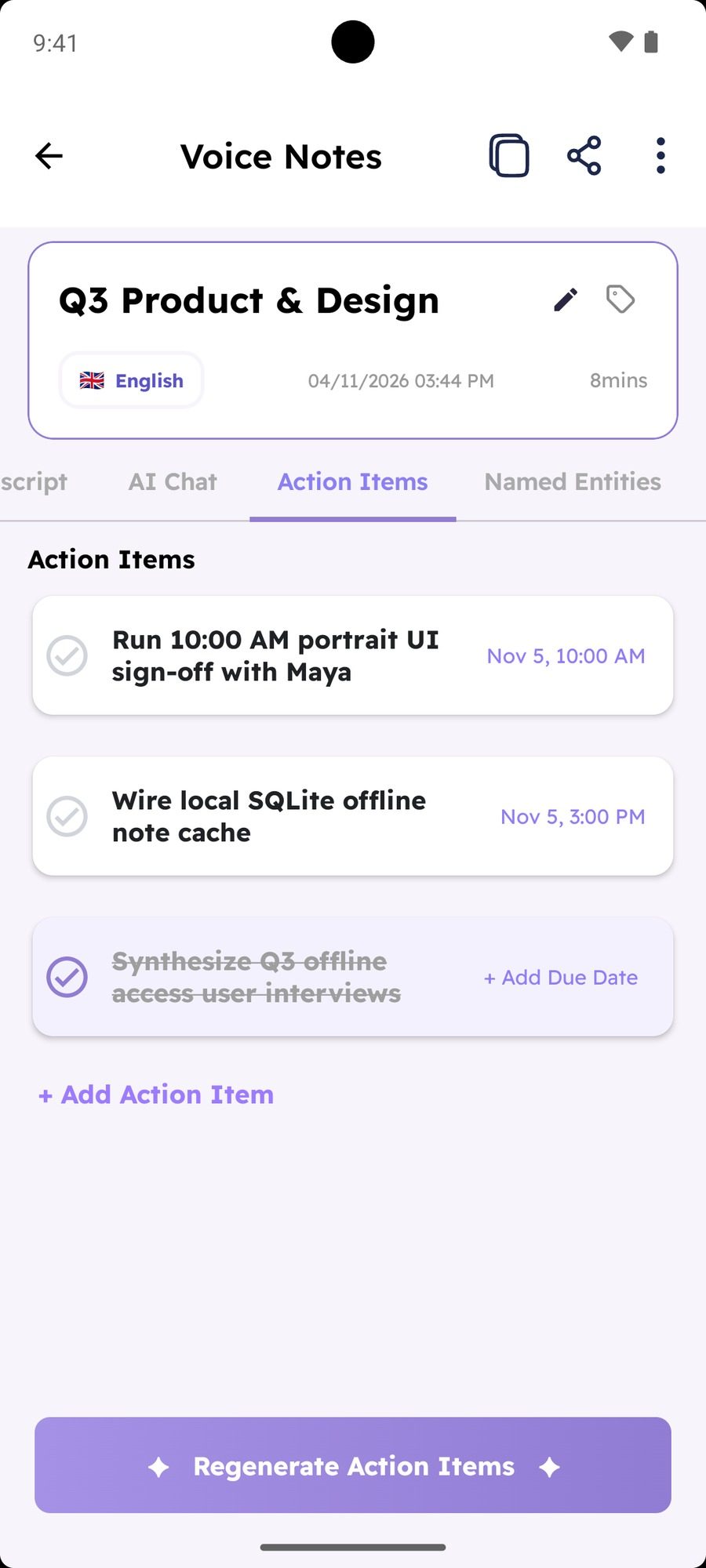
TelaNotes Action Items tab with checkable tasks and Nov 5 10:00 AM and 3:00 PM due alerts
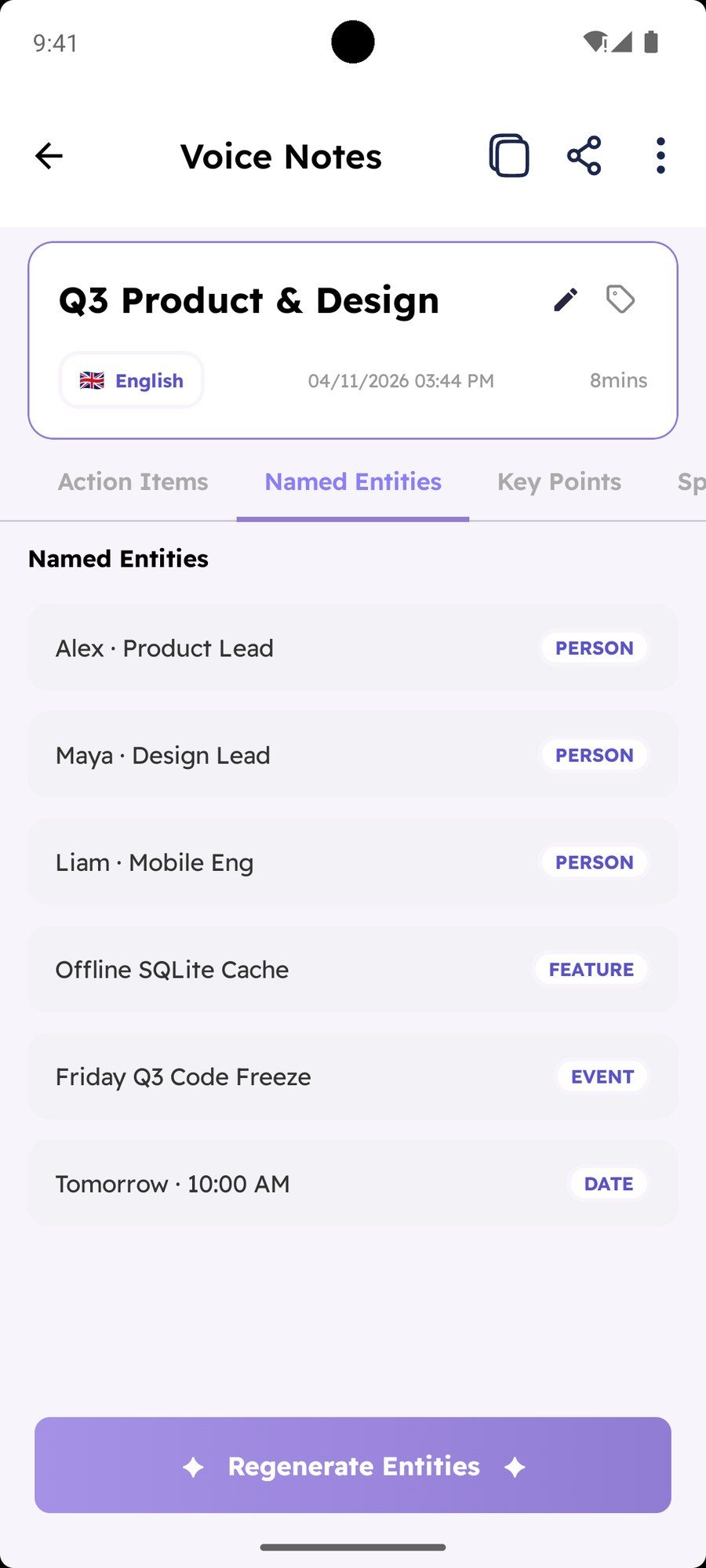
TelaNotes Named Entities tab grouping people, product features, events, and dates
TelaNotes Translation tab showing the Spanish language selector and translated speaker transcript
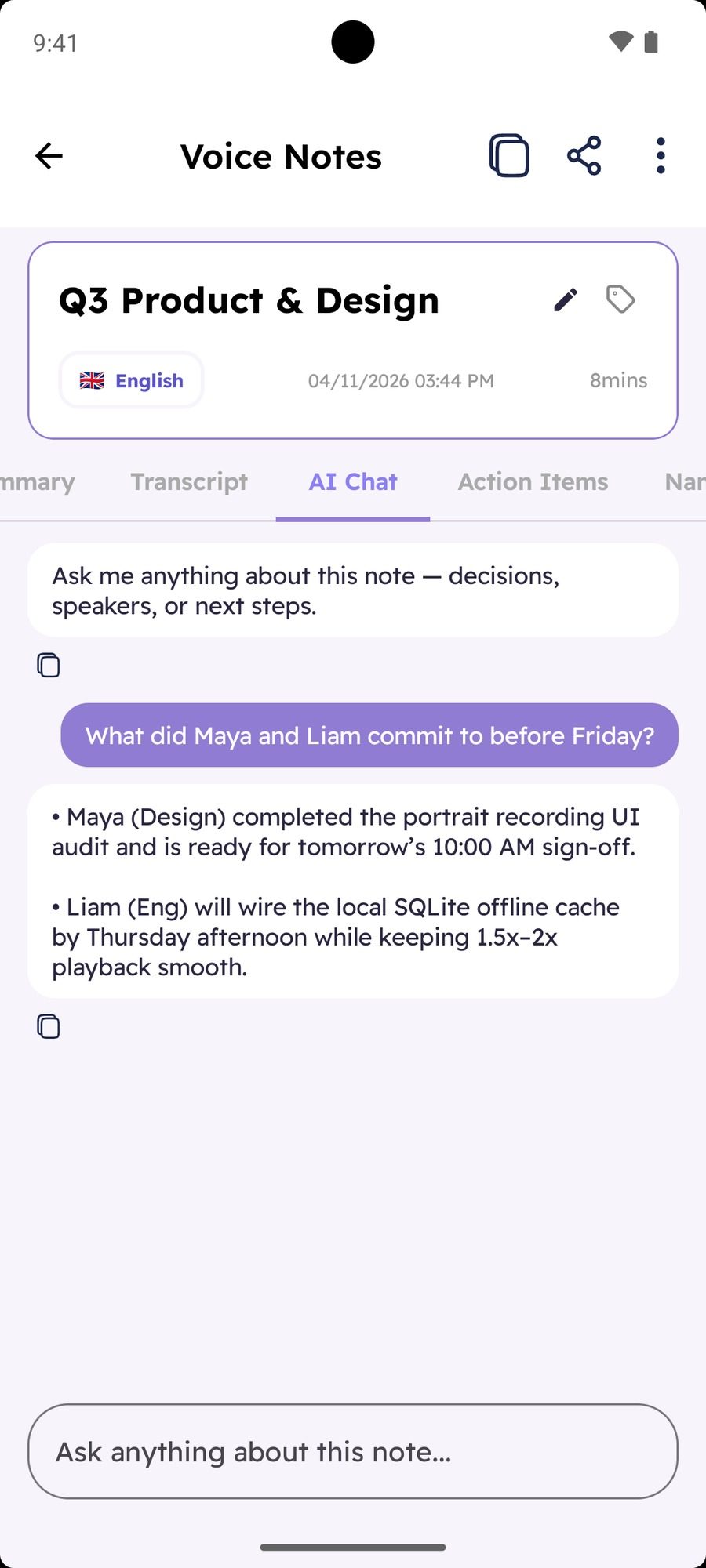
TelaNotes AI Chat tab answering What did Maya and Liam commit to before Friday
  1. Speaker transcript & audio player

    Tab 1

    Follow word-synced highlights as the recording plays at 0.5x, 1x, 1.5x, or 2x, with 10-second skip buttons and color-coded speaker labels.

  2. Structured summary

    Tab 2

    Read a short overview and grouped topic sections right after you stop recording, or tap regenerate anytime to refresh it.

  3. Per-speaker breakdown

    Tab 3

    See what each person contributed in their own card so nobody’s updates or questions get mixed up in a busy room.

  4. Bulleted key points

    Tab 4

    Skim the main decisions in five or six short bullets before walking into your next class or client call.

  5. Action items & due-time alerts

    Tab 5

    Check off next steps, add new tasks by hand, and set exact date and time notifications that sync with your ToDos tab.

  6. People, dates & terms

    Tab 6

    Pull names, deadlines, product terms, and events into one clean list so you never have to hunt for a spelling or date.

  7. In-note translation

    Tab 7

    Pick a language in the header to read the full speaker-labeled note in Spanish, French, German, Arabic, Japanese, and 40+ more.

  8. Ask this note

    Tab 8

    Ask direct questions about what was said, add a task straight from chat, or copy an answer in one tap.

  • Up to 3 #tags per note Add tags like #product or #law101 right under the title to filter your notes later.
  • Rename speakers once Change Speaker 1 to a real name and every tab in the note updates with it.
  • 80% to 160% reading size Adjust text size with the Aa slider, edit any section by hand, or share in one tap.
  • Delete audio, keep text Free up phone storage anytime while keeping your transcript, summary, and tasks.

Made for people who listen first.

Leads, researchers, students, reporters, and consultants use TelaNotes so they can look up from the keyboard and still keep every detail.

  • Portrait of Maya Lin, Medical student in New York

    Maya Lin

    Nursing & Med student · New York

    “I set my phone on the desk during pharmacology lectures and actually listen. By the time class wraps, drug mechanisms are sorted and study quiz flashcards are ready.”

  • Portrait of Julian Vance, Researcher in Boston

    Julian Vance

    Postdoc researcher · Boston

    “Half my week is lab seminars and the other half is long PDF papers. Keeping both in one place where I can filter by tag saves my evenings.”

  • Portrait of Sarah Jenkins, 1L Law student in Oxford

    Sarah Jenkins

    1L Law student · Oxford

    “During rapid Socratic cold calls, TelaNotes separates the professor's rulings from student hypos. When reviewing for finals, I tap any rule to hear the exact dialogue.”

  • Portrait of Marcus Chen, ADHD & STEM student in Berkeley

    Marcus Chen

    ADHD & STEM student · Berkeley

    “No more panic when my attention drifts during an eighty-minute lecture. I tap the summary bullet where I spaced out and hear the explanation immediately.”

  • Portrait of Elena Rostova, Consultant in London

    Elena Rostova

    Consultant · London

    “I snap photos of whiteboard sketches, record a five-minute debrief in the cab, and send clean notes before I’m back at my desk.”

Around the app.

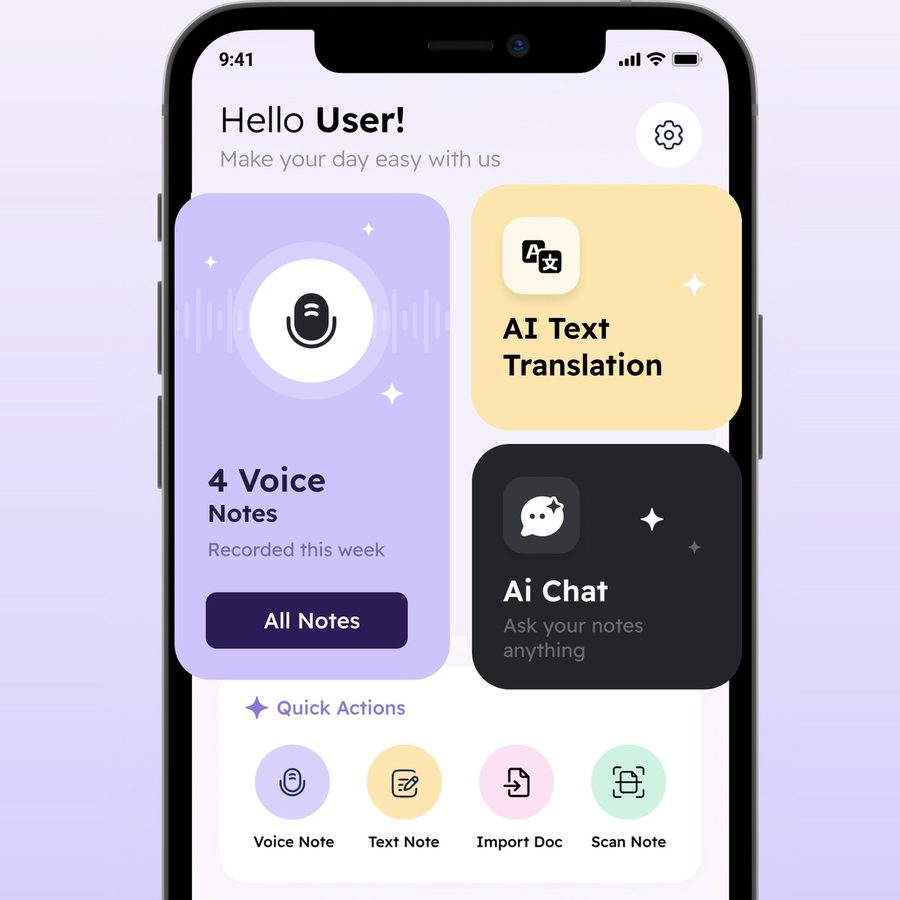
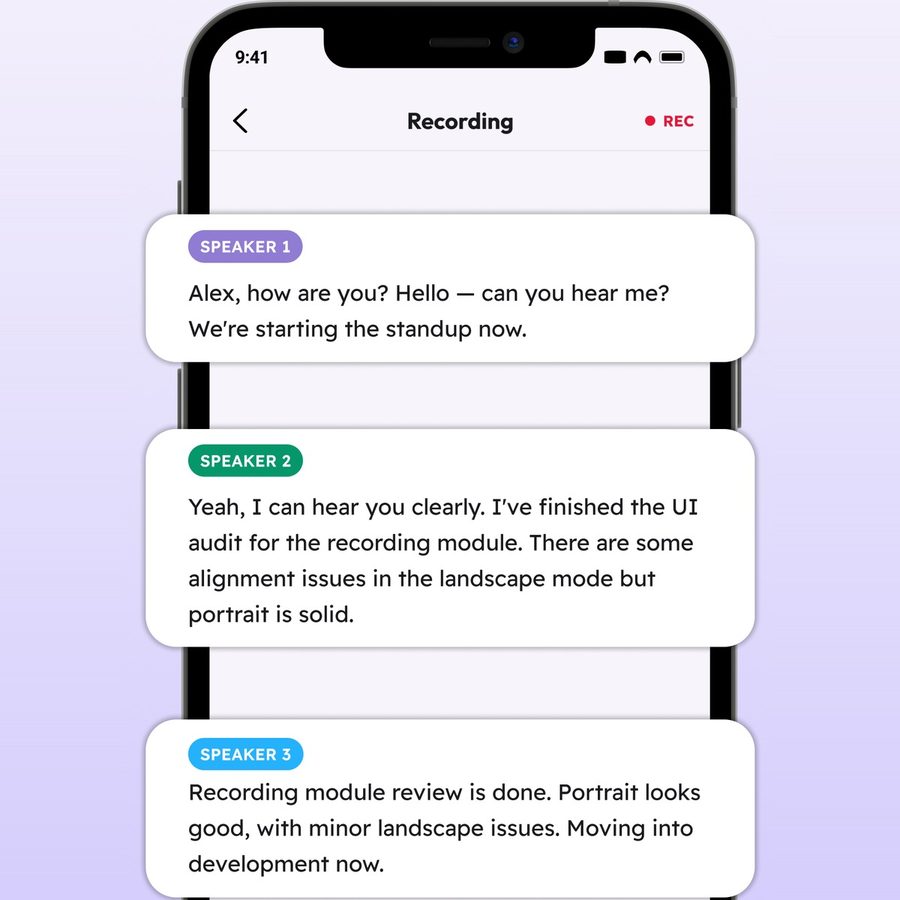
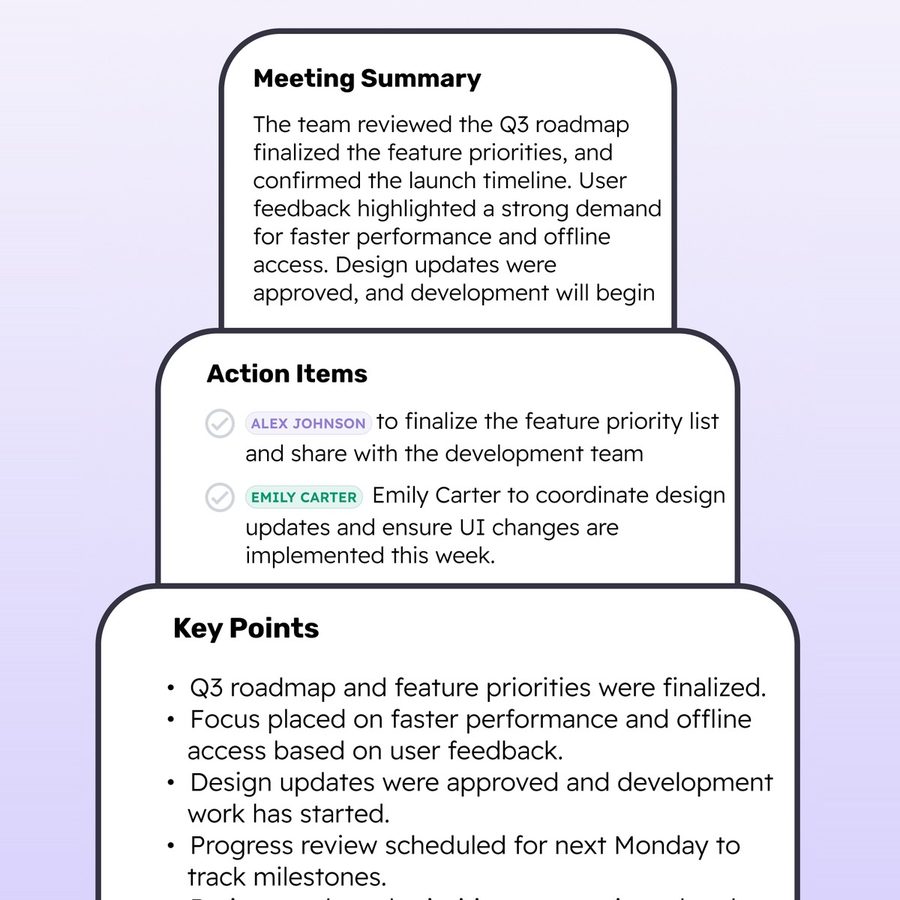
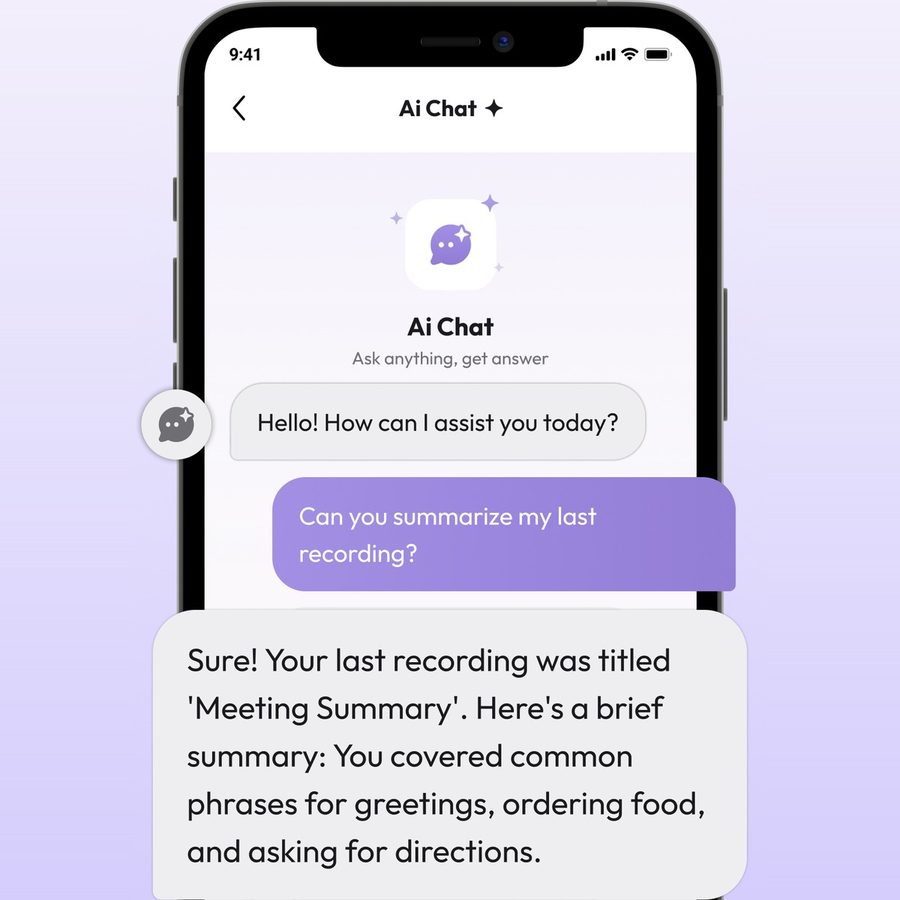
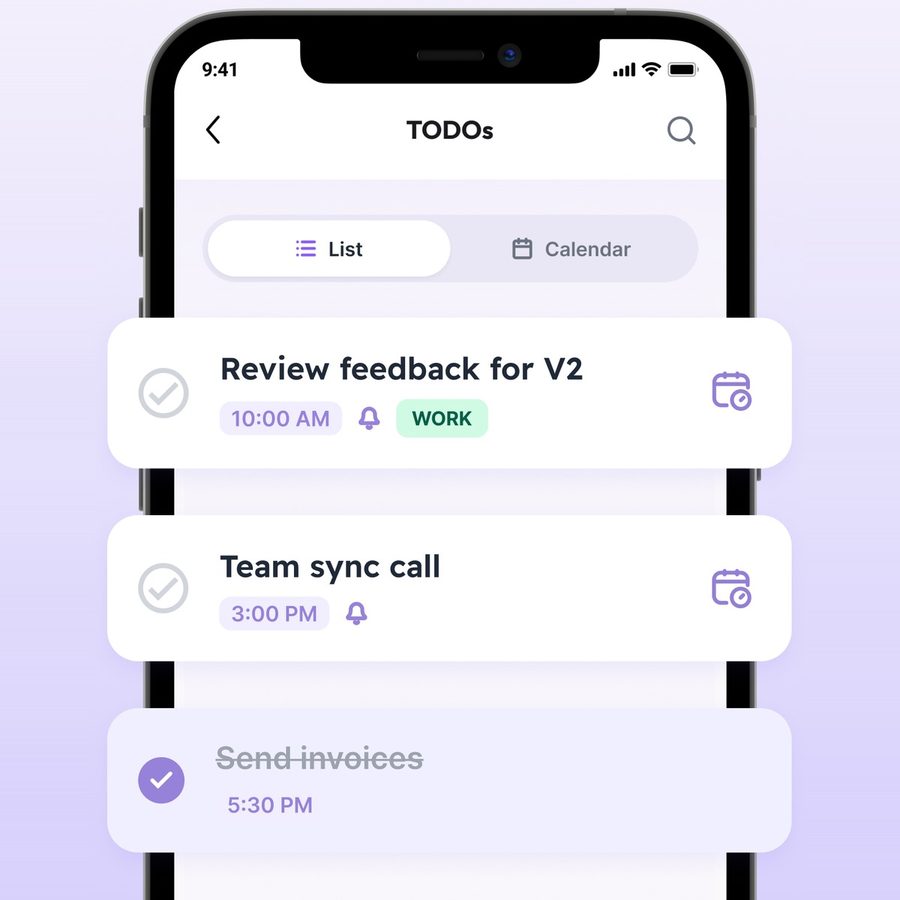
Screens from TelaNotes across home quick actions, speaker recording, summaries, all-notes chat, and the daily task calendar.

TelaNotes home screen with Voice Notes, Translation, AI Chat, and quick buttons for Voice, Text, Document, and Scan

Maya · Product sync

“Two tasks pulled straight into my afternoon ToDos.”

10:00 AM & 3:00 PM alerts set

TelaNotes recording view separating Speaker 1, Speaker 2, and Speaker 3 into clean dialogue cards
TelaNotes summary cards showing overview, tasks by speaker, and bulleted key points
TelaNotes chat view answering a question about the latest recording

Sarah · Law seminar

“Asked chat to compare today’s case with last Tuesday’s class.”

Search across all notes at once

TelaNotes ToDos screen with List and Calendar views, scheduled times, and completed checkboxes

Julian · Guest talk

“Recorded the talk in German and read the summary in English.”

40+ languages supported

No frantic typing. No awkward call bots. No buried to-dos. Hit record and listen.

We made TelaNotes for rooms where listening matters more than staring at a keyboard: college lecture halls, lab seminars, client tables, and study groups. Traditional note taking forces you to scramble to type while missing the core explanation. TelaNotes captures every spoken word, links each bullet to audio playback, and creates your study pack in thirty seconds.

Your notes and audio recordings stay saved locally on your phone in an encrypted database. No uninvited third-party bots joining your classes, and no commercial cloud scraping your private study notes.

More than a recorder.

Beyond individual recordings, TelaNotes gives you cross-note search, a daily task calendar, a live two-way interpreter, and fast typed notes in the same app.

Start free. Upgrade when your week gets full.

Download TelaNotes free on iOS or Android. Move up to Pro anytime with weekly or monthly plans billed through the App Store or Google Play.

Starter

Freeto download

Built for trying voice notes, jotting typed thoughts, and keeping daily tasks on your phone.

  • Starter voice transcriptions and summaries
  • Unlimited typed and pasted text notes
  • ToDos list, calendar view, and due-time reminders
  • Audio player with 0.5x to 2x speed and 10s skip
  • Local note and audio storage on your phone

For iOS and Android. Start recording in seconds.

Pro Access

TelaNotes Pro

Proweekly or monthly

For daily meetings, long lectures, PDF and Word files, camera scans, and multi-language work.

  • Longer recordings, audio file imports, and YouTube links
  • Speaker labels and per-speaker summaries
  • PDF, DOCX, and camera scan note creation
  • AI chat inside one note or across all notes
  • In-note and live two-way translation in 40+ languages
Try Pro in the app

Billed through Apple App Store or Google Play. Cancel anytime in settings.

Questions, answered plainly.

Have a question about a recording or your plan? Email [email protected] and a real person on our team will write back within one business day.

Email support Replies in 1 business day
Can I record in-person college lectures with TelaNotes?

Yes. Sit down in your lecture hall, place your phone on the desk, and tap start. TelaNotes records quietly in the background even when your screen sleeps, capturing full eighty-minute lectures without arbitrary thirty-minute cutoffs.

How does tap-to-audio playback work during study sessions?

Every summary bullet, action item, and transcript sentence is time-stamped. When you review your notes before exams, tap any confusing sentence or definition to immediately hear the professor's spoken words at that exact second.

What else can I turn into a note besides live recordings?

You can import audio files from your phone, paste YouTube links, open PDF and DOCX documents, scan printed handouts or slides with your camera, or write and paste text notes directly.

Can I ask questions across more than one note?

Yes. Open the AI Chat tab inside any note to ask questions about that single session, or open AI Chat from the home screen to search, compare, and create tasks across all your notes at once.

Which languages work for transcription and translation?

TelaNotes transcribes, translates notes in place, and runs two-way speech and text translation across 40+ languages, including English, Spanish, French, German, Arabic, Mandarin, Japanese, Korean, Portuguese, and Hindi, with automatic language detection.

How do Pro subscriptions and cancellation work?

Download TelaNotes free to use starter recordings, text notes, and ToDos. Weekly and monthly Pro plans are handled through your Apple App Store or Google Play account, where you can check local pricing or cancel anytime in two taps.

Say hello. Real people read every note.

Direct support
[email protected]
Platforms
iOS (App Store) & Android
Storage
On-device notes · Opt-in AI processing
Reply time
Within one business day, Monday to Friday